Content has to be ready before it goes to air
The music library is more than a list of files. Its purpose is to shorten the operator’s path from “I know what I want to play” to actually adding the content to a working playlist.
In a folder on disk, songs exist as files. In radio work, they need to be content that can be quickly found, recognised, previewed and added to the programme. That is why the library is connected to the playlists, the title display, artwork and the other parts of the system.
How it is used in real work
You add individual files or entire folders to the library, and search works by name, folder and extension. Before a show or while preparing the programme, the operator finds music and sends it to playlist A or B. During a live show, the same library is used for quick searches and for replacing the next item — without opening Windows Explorer and digging through ten folders.
With a large music collection, a few seconds saved on every song choice quickly add up to a big difference. More importantly, it is less likely that a wrong file or an old copy of a track ends up in the programme.
Connected to the playlists
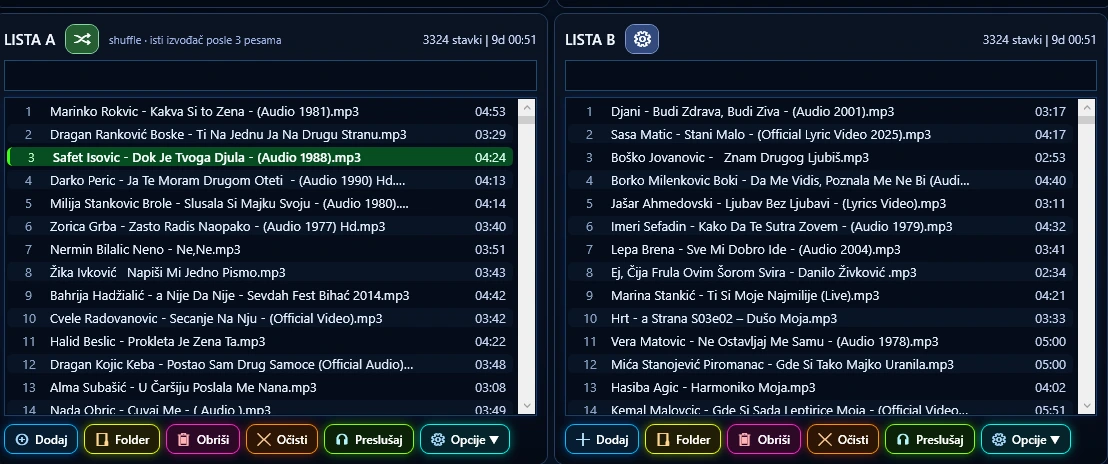
The library does not live separately from the player. A selected track becomes part of playlist A or B, and the playlists hold the working running order. The library is the source; the playlist is the precise plan of what you want to happen on air. Playlists can be saved, imported and exported, so you do not have to rebuild a prepared programme from scratch every time.
Content display and artwork
On Air Studio reads embedded artwork and works with content images. An image helps you recognise a track at a glance, but the goal of the library stays the same: fast and accurate selection of audio content.
What you get
- Less searching. Content is available in the working environment, without navigating the folder structure on disk.
- Faster reactions during a show. If the plan changes, another song is found and prepared while the programme is already running.
- Fewer mistakes. A clearer display and centralised selection reduce the chance of picking the wrong file.
- Better groundwork for automation. Playlists and other programme elements are built from the library, so its organisation directly affects the quality of the automation.
The library is no substitute for good file organisation. On Air Studio makes working with content easier, but it cannot fix a library in which hundreds of files have unclear names or duplicates that cannot be told apart. You get the best results when files are well named and the metadata is reasonably maintained.